Instant, zero-delay black
The exact #000000 stage renders on first paint. No spinner, no preview frame, no flash of white while a script loads.
Free · no signup · works offline
A free online black screen in a true #000000, one tap away. No splash screen, no cookie wall, no clutter — just a full black screen, then every screen tool you actually need.
The tool, right now
Click the panel — or press F — to fill the screen. Choose a colour below, or switch on keep-awake for long sessions.
Tap to go fullscreen · F or Space · Esc to exit · ← → to change colour
Quick colours
Need more control? The colour suite adds brightness, colour temperature and any HEX value.
Why it feels fast
Every tool is a static, pre-rendered page with a few kilobytes of JavaScript. The black stage paints before anything else, so there is never a delay between your tap and darkness.
The exact #000000 stage renders on first paint. No spinner, no preview frame, no flash of white while a script loads.
Native fullscreen where it exists, a locked fullscreen overlay where Safari refuses. Browser chrome collapses as far as the platform allows.
One switch holds a screen wake lock so your device stays lit while you read, film, cook or present.
Optional pixel shifting nudges the image every 30 seconds so no group of pixels is lit continuously.
F or Space toggles fullscreen, Esc exits, arrow keys cycle colours, and every control is labelled and focusable.
No account, no upload, no analytics. Uploaded logos and generated downloads never leave your device.
The full suite
Instant #000000, fullscreen, no lag
Maximum brightness, clean white light
12 presets + any custom HEX
Auto-cycling solid colours + pixel grid
Grey steps, banding and uniformity
Cracked glass illusion, fullscreen
Customisable digital rain
Bouncing disc with your own logo
480p to 8K and custom sizes
What people use it for
Turn an OLED phone, watch or tablet into a dark clock, sleep aid or battery-sipping display. Black pixels are off, so they cost nothing.
Use a screen as a black fill card, a clean dark backdrop for product shots, or a colour-matched light source on a phone you already own.
Check a used laptop, monitor or TV for dead pixels, backlight bleed, mura and burn-in before you hand over money.
Drop to pure black between slides, hide a screen during a live stream, or use the Matrix and static screens for B-roll and effects.
Honest comparison
We studied the tools people already use and rebuilt the whole experience around speed, privacy and mobile reality. No paywalls, no interstitials.
| Feature | Black Screen Free | Typical screen sites |
|---|---|---|
| First paint before the tool is usable | Immediate — tool is the hero | Marketing content first |
| True #000000 stage | Yes, exact hex | Usually yes |
| iPhone / iPad fullscreen | Locked overlay fallback | Often broken |
| Keep screen awake | Wake Lock API built in | Rare |
| Burn-in protection | Pixel-shift + timer | Almost never |
| DVD screensaver with your logo | Client-side upload | Not offered |
| Dead pixel workflow | Auto-cycle + grid + guide | Basic colour cycle |
| Downloads up to 8K | 480p → 8K + custom | Limited sizes |
| Offline / installable | Full PWA | Online only |
| Trackers | None | Ad and analytics scripts |
Learn
The physics behind pure black on OLED and AMOLED panels.
ReadA five-minute routine that finds dead, stuck and hot pixels.
ReadWork around Safari’s fullscreen limits — and add to Home Screen.
ReadThe black screen guide
A black screen sounds simple, but it is one of the most useful things a display can show. Used well, it saves OLED battery, cuts glare in a dark room, gives you a clean backdrop for photos and video, and gives you a fast way to test a panel for dead pixels and burn-in before you buy it. This guide covers what a pure black screen is good for, when a white screen is the better tool, and how to use Black Screen Free for each job.
A pure black screen shows every pixel at the lowest luminance the panel can manage. On an OLED or AMOLED display those pixels switch off completely, so the screen becomes as dark as a panel that is turned off. On an LCD, LED or plasma display the backlight stays on behind the black pixels, so the result is still a clean, uniform dark grey rather than a true off state. Either way, a black screen emits far less light than a white one and gives your eyes a break in a dim room.
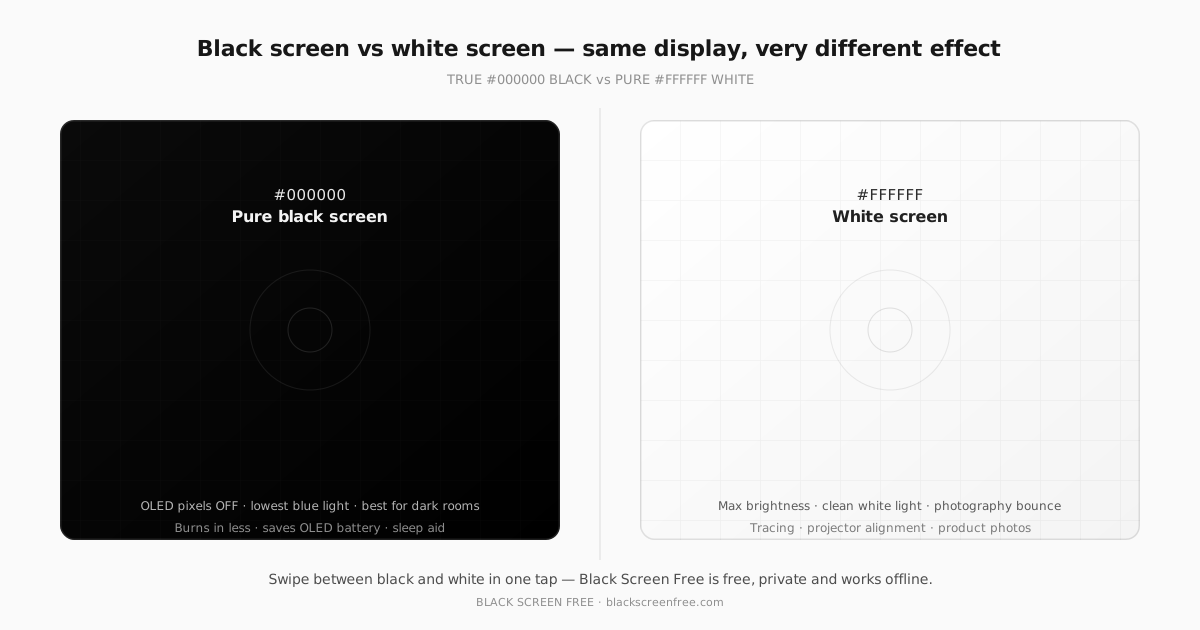
A black screen is the right choice when you want darkness, low light or low power. A white screen is the right choice when you want maximum brightness: photography bounce light, tracing paper replacement, a projector alignment target, or a clean white backdrop for product photos. Black Screen Free gives you both, plus a full colour suite in between, so you can pick the exact luminance and hue a job needs.
A black screen is useful for saving OLED battery, dimming a room, protecting a panel from burn-in, hiding a display during a presentation or stream, and testing a screen for dead pixels. People also use a full black screen as a sleep aid, a black screen wallpaper on a phone, or a clean dark backdrop for photos and video.
For most people, yes, in a dark room. A pure black screen emits almost no light, so it does not glare at you and it sends far less blue-rich light to your eyes at night. That reduces the contrast your pupils have to fight and can ease eye strain. It is not a medical treatment and will not fix an underlying eye condition, but as a screen choice a full black screen is the gentlest thing a display can show.
On OLED and AMOLED displays, yes. Every pixel makes its own light, so a black pixel is simply off and draws almost no power. A fullscreen black page can use a small fraction of the energy of a bright white one, which is why dark modes and black wallpapers help OLED phones, tablets and laptops last longer. On LCD, LED and plasma displays the backlight stays on behind black pixels, so the battery saving is minimal.
A black screen shows the lowest luminance the panel can manage and is best for darkness, low light and low power. A white screen shows maximum brightness and is best for photography bounce light, tracing, projector alignment and product photos. Black Screen Free gives you both, plus a full colour suite in between, so you can pick the exact luminance and hue a job needs.
Open this page, tap the black panel or press F, and the whole display becomes pure #000000. That is all there is to it: no app, no signup and nothing to download. If you want a file instead of a live screen, use the colour downloader to export a black image from 480p to 8K and set it as your wallpaper.
It helps, although it cannot undo existing damage. Burn-in comes from static bright content lighting the same sub-pixels for hours, so black pixels are the safest pixels: on OLED they are switched off and age very little. Using a black screen instead of a bright static image, adding gentle pixel shifting, and switching the display off when idle all slow wear down.
To try the black screen now, open the fullscreen black screen and tap the panel or press F. To compare, switch to the colour suite for any HEX value, brightness and colour temperature. To check a panel you are thinking of buying, run the dead pixel test and the burn-in test. To keep a screen awake during a long session, use the keep screen awake tool.
FAQ
Everything people ask about a black screen, from how to use it to what to do when one will not turn on. Still unsure? The full FAQ goes deeper on brightness, privacy and device support.
Open this page and tap the black panel, or press the Fullscreen button. On a desktop you can also press F or Space to fill the display. The stage is painted with a true #000000 black screen, so there is nothing to load and no waiting. To change colour, use the quick swatches or the custom picker. To keep a display awake during a long session, switch on Keep screen awake. To leave, press Escape or tap the exit control. Everything runs in your browser, so the tool works the moment the page appears and never asks you to sign in.
Open the fullscreen black screenYes, for most people in most situations. A pure black screen emits almost no light, so it does not glare at you in a dark room and it sends far less blue-rich light to your eyes at night. That reduces the contrast your pupils have to fight and can ease eye strain when you read, rest or try to fall asleep. It is not a medical treatment and will not fix an underlying eye condition, but as a screen choice a full black screen is the gentlest thing a display can show.
It helps, although it cannot undo existing damage. Burn-in comes from static bright content lighting the same sub-pixels for hours, so black pixels are the safest pixels: on OLED they are switched off and age very little. Using a black screen instead of a bright static image, adding gentle pixel shifting, and switching the display off when idle all slow wear down. Plasma panels can also burn in from static content. If you already see ghosting, run the burn-in test to judge how severe it is before deciding on a repair or a replacement.
Run the burn-in and uniformity testCommon uses include dimming a room at night, saving battery on an OLED phone, acting as a clean dark backdrop for photography and filming, hiding a screen during a presentation or screen share, protecting an OLED panel from burn-in, and testing a display for dead pixels. People also use a full black screen as a sleep aid, as a black screen wallpaper on a phone, or to hide browser content during a video call. If you need a file rather than a live tab, the colour downloader exports a pure black screen image at any size up to 8K.
Download a black screen imageYes, and a black screen is one of the most useful test patterns. Dead pixels stay black on every colour, so they vanish against black but stand out on white, red, green and blue; black is also where hot pixels, which stay bright, are easiest to spot. For a full diagnosis, run the dead pixel test, which cycles the display through solid colours fullscreen with an optional pixel grid. Watch each colour for ten to fifteen seconds, note anything suspect, then classify it as dead, stuck or hot.
Open the dead pixel testOn OLED and AMOLED, yes. Every pixel makes its own light, so a black pixel is simply off and draws almost no power; a fullscreen black page can use a small fraction of the energy of a bright white one. That is why dark modes and black wallpapers help OLED phones, tablets and laptops last longer. On LCD, LED and plasma displays the backlight stays on behind black pixels, so you still get a clean dark screen but the battery saving is minimal.
Open this page, tap the black panel or press F, and the whole display becomes pure #000000. That is all there is to it: no app, no signup and nothing to download. If you want a file instead of a live screen, use the colour downloader to export a black image from 480p to 8K and set it as your wallpaper. On Android the browser can hide the address bar for a truly full black screen; on iPhone and iPad we open a locked overlay with no scroll and no chrome so the effect is the same.
Make your screen black nowCompletely free, with no account, no trial and no paywall. Black Screen Free is a set of static pages that run entirely in your browser, so there is nothing to subscribe to and no advertising scripts slowing it down. Every tool is available to everyone, from the black screen and white screen to the colour suite, dead pixel test and burn-in test. There is no tracking either: no analytics, no cookie wall and no uploads, because nothing you do here is ever sent to a server.
Yes. The tool is built mobile-first, so on a phone or tablet it goes fullscreen with a single tap. Android browsers support true fullscreen; where Safari on iPhone and iPad will not let a page element go fullscreen, we open a locked overlay that removes scrolling and browser chrome so it looks and behaves the same. You can add the site to your home screen and it then opens offline like a native app, which is handy for a black screen phone wallpaper or a night-time sleep aid.
Press Escape on a keyboard, or tap the small exit control that appears when you move the pointer or touch the screen. If you entered fullscreen by tapping the panel, the same tap-to-exit control returns you to the page. On the iPhone and iPad fallback overlay, swipe or tap Exit to close it. Escape also works whenever the stage has focus, and the shortcuts are ignored while you are typing in an input field. The page never traps you, and nothing is saved or changed on your device, so closing the tab always brings you straight back.
Open the black screenYes. The stage is painted with the exact hex value #000000, with no near-black, no gradient and no overlay. On OLED and AMOLED panels those pixels switch off completely, which is what makes a true black screen both perfect for darkness and better for battery life. On an LCD the backlight stays on behind the pixels, so black is the darkest the panel can render rather than a fully off state. You can check it yourself: open the tool fullscreen in a dark room and it is hard to tell the panel apart from a switched-off one.
Yes. The site is a Progressive Web App, so after the first visit the whole toolset is cached by a service worker and keeps working with no connection at all. Add it to your home screen and it opens like a native app, which is useful when a black screen doubles as a bedside light or a sleep aid with no Wi-Fi in reach. Nothing needs to load from a server once the page has been visited once, so it stays instant even in airplane mode.
No. There is no analytics, no cookie banner, no third-party script and no server round-trip for any tool. Files you load, such as a logo for the DVD screensaver, are processed entirely in your browser and never leave your device, and generated colour images are drawn on a canvas and exported locally. The only thing stored is your light or dark theme preference, saved in localStorage, and it never leaves your browser. There is no consent wall either, because there is nothing to consent to.
A phone can be powered on with a black display for several reasons: the brightness is set to zero, the phone is stuck in a sleep or always-on state, a case or screen protector is covering the proximity sensor, or the display cable has failed. Common fixes are to press the power button, disable auto-brightness and raise the brightness, then force a restart by holding the power and volume keys. If the phone still makes sounds or vibrates but shows nothing, the panel is likely faulty. This free black screen tool is for making a working screen show black on purpose, not for repairing a device.
An iPhone screen can go black because the battery is empty, the display is dimmed to zero, the phone has crashed into a black state, or the screen hardware has failed. Try a force restart first: press and quickly release volume up, then volume down, then hold the side button until the Apple logo appears. If the phone vibrates or rings but stays dark, connect it to a charger and check for a charging sound. If nothing revives it, the display likely needs a repair. This page is a free online black screen tool, not a device fix.
A screen that keeps going black is usually following a power-saving rule rather than failing. The display sleeps after a short timeout, auto-brightness dims it in low light, a case covers the proximity sensor, or a battery-saver mode blocks background activity. Check your display timeout and auto-lock settings, clean the sensor area and update the device. If the blackouts are random and come with flickering or lines, suspect a loose cable or a failing panel. To stop a working screen from sleeping on purpose, use the keep-awake tool.
Keep your screen from sleepingA computer screen can go black because the monitor is asleep, the input source is wrong, the display cable is loose, or the machine has crashed or entered sleep. Check that the monitor is on the correct HDMI, DisplayPort or USB-C input, reseat the cable at both ends, and press a key to wake the system. If the computer is clearly running but the screen stays dark, try a second monitor or a hard restart. A plain black screen on a working display is also exactly what this online black screen produces on purpose.
A TV showing a black screen usually has no signal rather than a fault: the wrong input is selected, a streaming app has crashed, the source device is asleep, or the cable has come loose. Switch to the correct input, restart the source device, reseat the HDMI cable and try another port. If you still get sound but no picture, the issue is often the backlight or the panel itself. This site cannot repair a faulty TV, but it can turn any working browser display, including one cast to a TV, into a clean full black screen.
Start with a force restart: press and release volume up, press and release volume down, then hold the side button until the Apple logo appears. Next, charge the phone for at least fifteen minutes in case the battery is flat, and check that brightness is not at zero. If the phone responds but the screen stays black, try connecting it to a computer. When none of that works the display or its connector is likely damaged and needs a technician. This page is a free online black screen tool, so it shows black on purpose rather than fixing a hardware fault.
A black mark on a phone screen is usually one of two things: a physical mark such as a scratch, dust under a screen protector or a pressure spot, or a cluster of dead or stuck pixels. Clean the glass first with a dry microfibre cloth and lift the screen protector to check for trapped debris. If the mark is pixels, run a fullscreen test across solid colours: dead pixels stay black on every colour, while stuck pixels show one colour and may be revived. Marks that are not pixels mean the panel needs a repair.
Test the mark with the dead pixel testBlack screen of death is an informal term for a device that powers on but shows nothing on its display, usually from a hardware, firmware or driver fault rather than anything you did. It is unrelated to this website, which simply paints your screen pure black on purpose. On phones it is often fixed by a force restart or a battery top-up; on computers it can mean a failed GPU, a bad update or a crashed display driver. If your device turns on but stays black, treat it as a service and repair issue.
Install Black Screen Free to your home screen and every tool — black screen included — keeps working with no connection at all.